
Skip to content
Community Hub
  • Login
  • Site
  • Search
  • User

x Want to ask a question or reply? Click here to join the group.
Sage HRMS
  • United States

Sage HRMS

Welcome to the Sage HRMS Support Group on Community Hub! Available 24/7, the Forums are a great place to ask and answer product questions, as well as share tips and tricks with Sage peers, partners, and pros.
Sage HRMS Year-end Center Step 4: Reports and transaction history
  • Forums
  • Videos
  • Members
  • Resources
  • More
  • Cancel
  • Ask a question
  • Sage HRMS Year-end Center
  • Installation
  • +Payroll
  • Product and Tax Updates
  • Reports and Tax Forms
  • -Year-end Checklists
    • Attendance in Sage HRMS
    • -Canadian Payroll Year-end Checklist
      • Step 1 Download product update
      • Step 2: Update earnings and deductions
      • Step 3: Update taxes
      • Step 4: Reports and transaction history
      • Step 5: Year-end forms
      • Step 6: Prepare payroll next year
    • +U.S. Payroll Year-end check list
    • Human Resources - Benefits Topics
  • Year-end Training: Sage University
  • U.S. Acts & Legislations

Step 4: Reports and transaction history

With Sage HRMS, year-end requires a little effort to validate the amounts reported for tax filing purposes.

Verify the year-to-date values are correct for gross wages, earnings subject to tax, earnings subject to tax (no ceiling), employer expense, and employee withholding. Two reports you can use to validate this information are Earnings and Hours (select Reports > Canadian Payroll > Transaction Reports), and Tax Calculation Analysis (select Reports > Canadian Payroll > Transaction Reports).

Compare Earnings and Hours to Tax Calculation Analysis
Using the Earnings and Hours and Tax Calculation Analysis reports, select the Report Type of Calendar Year Totals to retrieve year-to-date information. Use the Report Summary pages and Year To Date columns in the reports to balance the following taxes:
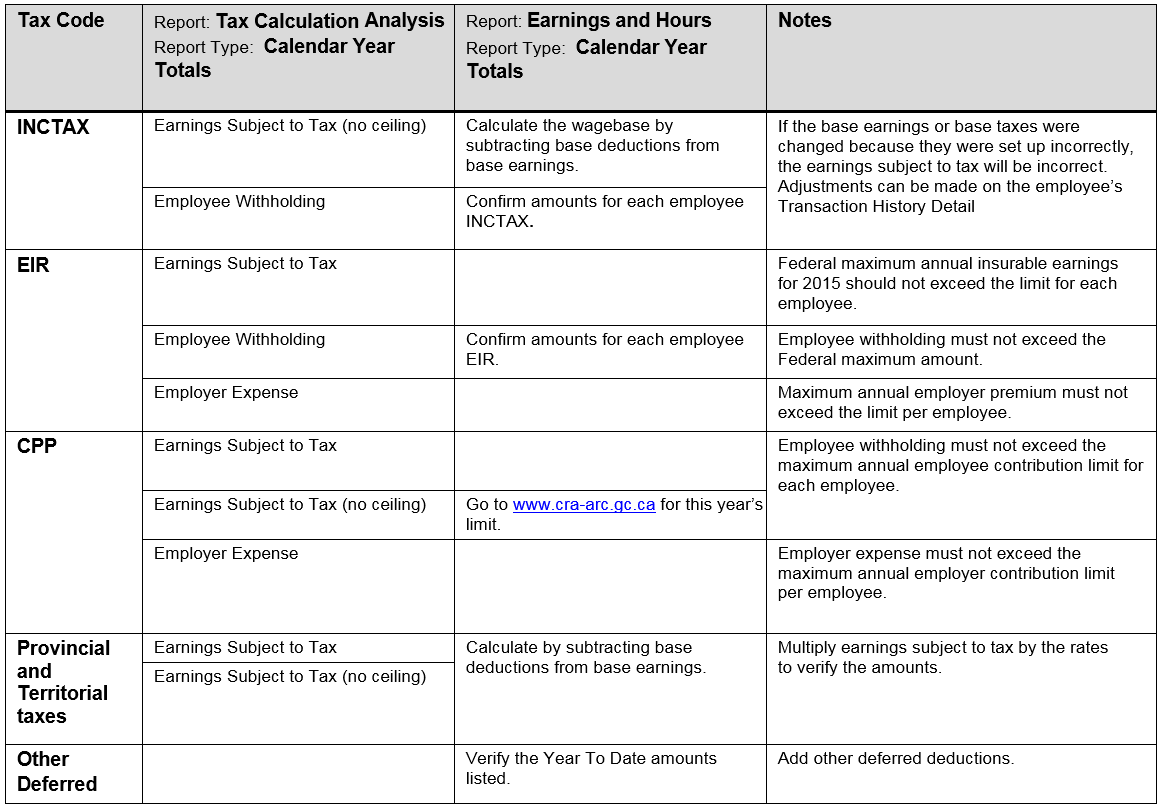
If amounts are incorrect, you can use the Transaction History task to make adjustments.

For more information about using Transaction History:

  • Review the online help topic Using Transaction History
  • Review the Knowledgebase articles 
    • How to create a transaction history record
    • Transaction history and general ledger 

previous       (Next

  • payroll
  • HR
  • Reports
  • transaction history
  • Share
  • History
  • More
  • Cancel
Sage
Africa & Middle East Canada France Portugal Spain United Kingdom & Ireland United States Global Solutions
  • facebook
  • instagram
  • linkedin
  • youtube
COMMUNITY
  • Site help
  • Site map
COMPANY
  • Overview
  • About us
  • Careers
  • News
  • Sage events
  • Investors
  • Sage Foundation
PARTNERS
  • Sage Partner Program
  • Partner Hub
  • Developers & ISVs
  • Sage Marketplace
SUPPORT & TRAINING
  • Contact Support
  • Sage Knowledgebase
  • Sage University
  • Sage Advice Blog
  • © Sage Group plc 2024
  • Privacy
  • Cookies
  • Community guidelines
  • General data protection regulation

*Community Hub is the new name for Sage City